E.Passport®
The Association of State and Provincial Psychology Boards® (ASPPB) created the E.Passport certificate to outline the criteria that licensed psychologists must meet to administer telepsychology services interjurisdictionally without obtaining additional licenses. The E.Passport is the first of two steps to enable licensed psychologists to provide telepsychology services across state lines.

Download the E.Passport Quick Guide for complete eligibility requirements.

Use your existing account or select “Register as a new user” if you’re new to PSY|PRO.
Select “Start my application” on the PSY|PRO home page.
The “E.Passport/APIT Application” label brings you to the overview.
Select “next” on the overview page to verify that you are licensed and physically located in a PSYPACT® participating state.
Select “Start my application” and make your payment ($440).
NOTE: The E. Passport processing fee is $400.00. You will be charged a total of $440.00 to include the PSYPACT Commission’s Authority to Practice Interjurisdictional Telepsychology® (APIT) processing fee.
Select the “edit” button under E.Passport on your My Activity Summary page. Use the “edit” button in each section to enter your information for the demographics, licensure, education, examination, conduct, and E.Passport acknowledgements sections. If you are a returning PSY|PRO user, confirm that the information already in the system is complete and correct. Save each section as complete.
Order a copy of your official graduate transcript to be sent directly to ASPPB from your degree-granting institution or its clearinghouse (email to transcripts@asppb.org or mail to ASPPB, P.O. Box 849, Tyrone, GA, 30290). Once received, your transcript will be attached to your E. Passport application.
You can submit your application for review using PSY|PRO as soon as you receive an email from ASPPB confirming that your official transcript has been uploaded to the system.
Upon approval of your E. Passport application, you will receive an email notification prompting you to log into your PSY|PRO account to complete your APIT application, which the PSYPACT Commission will process.
Download the ASPPB Mobility Program Policies and Procedures handbook for E.Passport details.

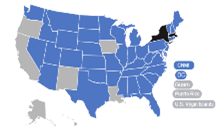
PSYPACT Participating Jurisdictions